
Creating and editing the WBS in Dynamics 365 Project Operations (External Scheduling)
When you enable external scheduling in Dynamics 365 Project Operations, the platform expects your plan to be written into a set of related planning tables (Dataverse). Your scheduling engine doesn’t just calculate dates—it must also keep the Work Breakdown Structure (WBS) consistent across tasks, assignments, and dependencies.
This post explains the core WBS data model you need to understand before you tackle higher-level scheduling topics like effort distribution, status date behavior, dependency-driven scheduling, and critical path logic.
Key idea: External scheduling is “data-model driven.” If your scheduler writes correct dates but breaks relationships (or writes incomplete records), the plan will look wrong—or fail validation—regardless of how good your scheduling math is.
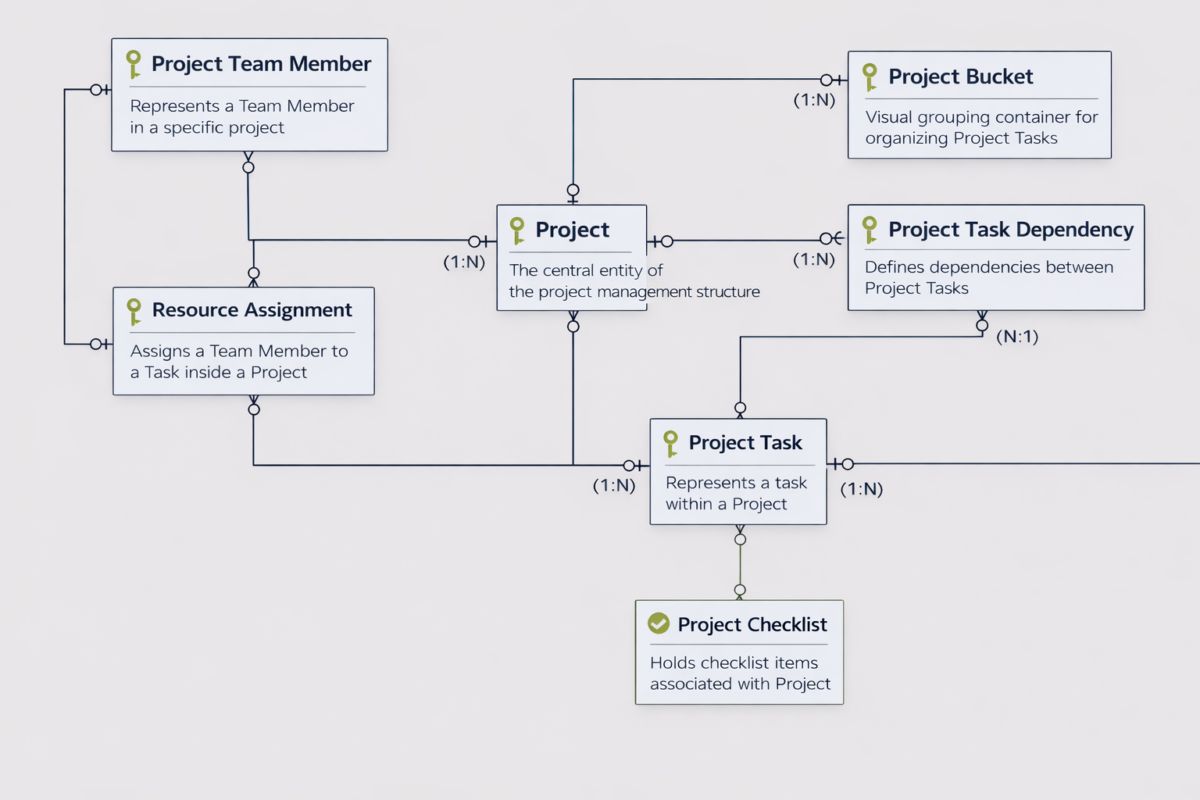
The planning data model (ERD)
This ERD summarizes the tables that form the backbone of project planning in Project Operations. These are the records you typically create and maintain when building or syncing an externally scheduled plan.
The core WBS tables you need to care about
At a minimum, external scheduling implementations typically revolve around these entities:
| Entity | What it represents | Why it matters for external scheduling |
|---|---|---|
| Project | The root container for the plan | Everything else hangs off it; many calculations and validations assume a consistent project “scope.” |
| Project Bucket | A visual grouping container for tasks | Useful for organizing larger plans; buckets often matter for UX and reporting even if your scheduler doesn’t “use” them. |
| Project Task | A planned activity in the WBS | This is where your scheduler expresses the timeline (start/finish), sequencing, and structure. |
| Project Task Dependency | A relationship between two tasks | Dependencies drive ordering, constraint propagation, and critical path behavior in most scheduling engines. |
| Project Team Member | A team member participating in the project | Assignments typically reference a team member; the team member is the “project context” for resourcing. |
| Resource Assignment | A team member assigned to a task | This is where task effort connects to a team member; it becomes the anchor for time-phased values like planned work. |
| Project Checklist | Checklist items attached to a task | Not required for scheduling math, but common in real plans; tasks often need to remain stable even as checklist items change. |
How the relationships work (in plain English)
The quickest way to internalize this model is as follows:
- A Project contains many Tasks. (Project → Project Task is typically 1:N)
- A Project can contain many Buckets, and a Bucket can contain many Tasks. (Project → Bucket is 1:N, Bucket → Task is 1:N)
- A Project contains many Team Members. (Project → Project Team Member is 1:N)
- A Task can have many Assignments, and a Team Member can have many Assignments. (Task → Assignment is 1:N, Team Member → Assignment is 1:N)
- A Dependency links two Tasks (a predecessor and successor). Over time you’ll treat dependencies as edges in a directed graph.
- A Task can have many Checklist items. (Task → Checklist is 1:N)
Scheduling mental model: Tasks are nodes. Dependencies are edges. Assignments connect tasks to team members and become the place where time-phased effort is recorded.
A practical “create order” for externally scheduled project plans
If you’re generating or syncing a plan (for example from an external scheduling service), a clean order of operations helps avoid broken references and partial states:
- Create or identify the Project (the root record).
- Create Buckets (optional, but recommended for organizing larger plans).
- Create Tasks (with WBS structure, bucket assignment, and initial dates if available).
- Create Dependencies (once tasks exist, you can safely link them).
- Create Project Team Members (the participants you can assign work to).
- Create Resource Assignments (connect tasks to team members, set effort-related values).
- Create Checklist items (optional; typically driven by delivery process rather than scheduling math).
Common mistakes (and why they hurt)
- Creating dependencies before tasks exist → leads to missing references or “half-built” graphs.
- Writing assignments without a stable team member model → your plan can’t reliably represent resourcing over time.
- Updating task dates without updating the related assignment/time-phased data → your timeline and your effort distribution drift apart.
- Not treating updates as idempotent (safe to replay) → integrations become fragile and hard to recover.
Summary
If you’re building an external scheduling engine for Project Operations, this WBS data model is your “ground truth.” Once you can consistently create and maintain these relationships, everything else becomes an algorithmic layer on top: sequencing via dependencies, effort distribution via assignments, and schedule adjustments via project calendar rules.